
Samsung MultiXpress SCX-8128NX/8128NA Driver and User Manual
The Samsung MultiXpress SCX-8128NX/SCX-8128NA is an enterprise-class A3 monochrome laser multifunction printer (MFP) designed for medium to large workgroups. It combines printing, copying, and color scanning capabilities, with fax functionality available as an optional feature on some configurations. The device is built to support high-volume office environments with reliable performance and advanced workflow features. The device includes automatic duplex printing and copying to reduce paper consumption. It supports paper sizes ranging from A5 to A3 (11 × 17 inches), with a standard paper capacity of approximately 1,240 sheets that can be expanded to a maximum of 2,180 sheets. The output tray holds up to 500 sheets, allowing the printer to handle large print jobs with minimal user intervention.
The printer delivers print and copy speeds of up to 28 pages per minute (ppm) for A4 or Letter-sized documents and 14 ppm for A3-sized documents. Samsung SCX-8128NX/SCX-8128NA produces the first printed page in approximately 8 seconds and offers a print resolution of 600 × 600 dpi, with an effective resolution of up to 9600 × 600 dpi for improved text and image quality. The integrated color CCD scanner supports an optical resolution of 600 × 600 dpi, with enhanced scanning up to 4800 × 4800 dpi. Documents can be scanned directly to destinations such as email, SMB shared folders, FTP servers, USB storage devices, network PCs, and shared folders, making it suitable for document digitization and workflow automation.
The printer is operated through a 7-inch WVGA color touchscreen, providing an intuitive interface for accessing print, copy, and scan functions. For connectivity, the Samsung SCX-8128NX/SCX-8128NA provides Gigabit Ethernet, USB 2.0 Device, and USB Host interfaces. It supports a wide range of network protocols, including TCP/IPv4, IPv6, SNMP, LDAP, SMTP, SSL/TLS, IPSec, Bonjour, and DHCP. The printer is compatible with PCL5c, PCL6, PostScript 3, PDF, and XPS printer languages, ensuring broad compatibility with various operating systems and business applications.
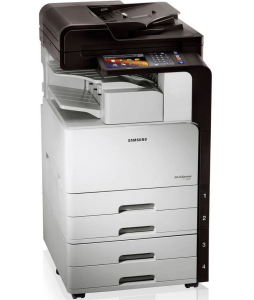
Samsung SCX-8128NA/SCX-8128NX Printer Features
Check below for technical features of the printer:
- Print Technology: Monochrome laser
- Display 7-inch WVGA color touchscreen LCD
- Functions: Print, Copy, Scan (Fax optional on some models)
- Standard Paper Capacity: About 1,240 sheets (varies by configuration)
- Print Speed: Up to 28 ppm (A4/Letter), 14 ppm (A3/11×17)
- First Page Out: Approximately 8 seconds
- Resolution: 600 × 600 dpi (up to 9600 × 600 dpi effective)
- Processor: 1 GHz Dual-Core (Chorus4N)
- Memory: 768 MB DDR3 (SCX-8128NA), 1 GB DDR3 (SCX-8128NX)
- Interfaces: Gigabit Ethernet, USB 2.0 Device, USB Host
- Network Protocols: TCP/IPv4, IPv6, SNMP, LDAP, SMTP, SSL/TLS, IPSec, Bonjour, DHCP
- Printer Languages: PCL5c, PCL6, PostScript 3, PDF 1.7+, XPS
Read Also: Samsung SCX-6322dn Driver and Manual
Download the Samsung SCX-8128NA/SCX-8128NX Driver and Manuals
Before downloading and installing the Samsung SCX-8128NA/SCX-8128NX driver, read this printer manual to set up the printer properly.
Samsung SCX-8128NA/SCX-8128NX User Guide Download
Filename: c05786231.pdf
File Size: 32.39 MB
Download the Samsung SCX-8128NA/SCX-8128NX Driver
Windows driver:
Samsung MultiXpress SCX-8128 Printer Driver Download
Filename: SCX-8123_8128_Series_WIN_PD_V3.12.29.07.51.exe
File Size: 30.6 MB
Version: V3.12.29.07.51
Samsung MultiXpress SCX-8128 Scanner Driver Download
Filename: SCX-8123_8128_Series_WIN_Scanner_V3.31.19.14.exe
File Size: 22.6 MB
Version: V3.31.19.14
macOS driver:
Samsung SCX-8128NA/SCX-8128NX Easy Printer Manager for MacOS Download
Filename: EasyPrinterManager_Mac_V1.02.07.zip
File Size: 49.1 MB
Version: V1.02.07