
Samsung SCX-4725FN Driver and User Manual
The Samsung SCX-4725FN is a monochrome laser multifunction printer designed for small offices and home-office environments. For paper handling, the printer comes with a 250-sheet input tray and a 100-sheet output tray. It supports various media types and sizes, including A4, Letter, Legal, envelopes, and labels.
It combines printing, copying, scanning, and faxing functions in one device. The printer can produce up to 24 pages per minute on A4 paper, with a print resolution of up to 1200 × 1200 dpi for sharp text output. Its first-page-out time is around 10 seconds, and it supports a monthly duty cycle of up to 10,000 pages. The Samsung SCX-4725FN includes both a flatbed scanner and a 30-sheet automatic document feeder (ADF), making it suitable for scanning or copying multi-page documents. The scanner has an optical resolution of 600 × 600 dpi and enhanced scanning up to 4800 × 4800 dpi. Copying performance matches the print speed at up to 24 copies per minute, while the built-in fax machine operates at 33.6 Kbps and can store up to 320 pages in memory. The printer uses a single black toner cartridge (SCX-D4725A) and includes 32 MB of onboard memory. It also supports manual duplex printing for two-sided documents.
Connectivity options include USB 2.0 and Ethernet 10/100 networking, allowing it to be shared across office networks. Although Samsung SCX-4725FN is an older model, it remains compatible with many Windows, Linux, and Mac systems through available drivers and community support.
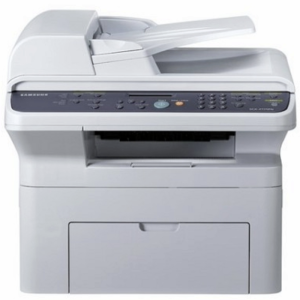
Samsung SCX-4725FN Printer Features
Check below for technical features of the printer:
- Printer type: Monochrome laser multifunction
- Paper input capacity: 250-sheet tray
- ADF capacity: 30 sheets
- Output capacity: 100 sheets
- Supported paper sizes: A4, Letter, Legal, envelopes, labels
- Functions: Print, Copy, Scan, Fax
- Print speed: Up to 24 ppm (A4)
- Print resolution: 1200 × 1200 dpi
- Scanner type: Flatbed + ADF
- Optical scan resolution: 600 × 600 dpi
- Enhanced scan resolution: Up to 4800 × 4800 dpi
- Copy speed: Up to 24 cpm
- Copy resolution: 600 × 600 dpi
- Fax modem speed: 33.6 Kbps
- Monthly duty cycle Up to 10,000 pages
- Connectivity USB 2.0, Ethernet 10/100
Read Also: Samsung CLX-3185FN Driver and Manual
Download the Samsung SCX-4725FN Driver and Manuals
Before downloading and installing the Samsung SCX-4725FN driver, read this printer manual to set up the printer properly.
Samsung SCX-4725FN User Guide Download
Filename: c05754320.pdf
File Size: 6.57 MB
Download the Samsung SCX-4725FN Driver
Windows driver:
Samsung SCX-4725FN Printer Driver Download
Filename: SCX-472x_Series_WIN_PD_V3.12.13.03.31.exe
File Size: 23.3 MB
Version: V3.12.13.03:31
Samsung SCX-4725FN Scanner Driver Download
Filename: Samsung_SCX-472x_Series_Scan.exe
File Size: 18.6 MB
Version: V3.21.60:09
macOS driver:
Samsung SCX-4725FN Driver for MacOS Download
Filename: SCX-472x_Series_Mac_PrinterDriver_5.01.02.zip
File Size: 7.1 MB
Version: V5.01.02
Samsung SCX-4725FN Scan Driver for MacOS Download
Filename: SCX-472x_Series_Mac_ScanDriver_2.31.49.zip
File Size: 32.0 MB
Version: V2.31.49