
Samsung Multixpress SCX-6322DN Driver and User Manual
The Samsung MultiXpress 6322DN is a monochrome laser multifunction printer designed for small to medium-sized workgroups. It combines printing, copying, scanning, and faxing capabilities in a single device, making it suitable for office environments that require reliable document handling and network connectivity. Paper handling consists of a standard 550-sheet input cassette and a 100-sheet multipurpose tray, providing a total input capacity of 650 sheets. An optional second 550-sheet cassette increases the maximum paper capacity to 1,200 sheets.
The printer delivers print and copy speeds of up to 22 pages per minute (A4) or 23 pages per minute (Letter). It produces print output with an effective resolution of up to 1200 dpi and includes standard automatic duplex printing for double-sided documents. Copying is performed at up to 22 copies per minute with a maximum resolution of 600 × 600 dpi. For scanning, the Samsung SCX-6322DN features a 50-sheet Duplex Automatic Document Feeder (DADF), allowing automatic scanning of both sides of a document. It offers an optical scan resolution of 600 × 600 dpi, with enhanced resolution up to 4800 × 4800 dpi. Scanned documents can be sent directly to email, network folders (SMB), FTP servers, or connected PCs. The integrated fax function supports the Super G3 standard with a 33.6 Kbps modem for fast document transmission.
The standard toner cartridge yields approximately 8,000 pages, while the imaging drum is rated for around 20,000 pages. The printer has a recommended monthly duty cycle of up to 20,000 pages and an estimated lifetime volume of approximately 300,000 pages, making it a dependable choice for medium-volume office printing. The Samsung MultiXpress SCX-6322DN supports USB 2.0, 10/100 Ethernet, and IEEE 1284 parallel connectivity, and it is compatible with both PCL 6 and PostScript 3 printer languages.
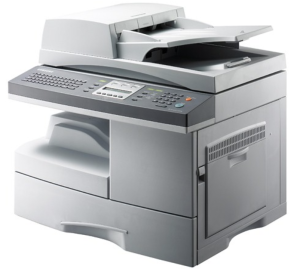
Samsung SCX-6322DN Printer Features
Check below for technical features of the printer:
- Functions: Print, Copy, Scan, Fax
- Print technology: Monochrome laser
- Print speed: Up to 22 ppm (A4) / 23 ppm (Letter)
- Print resolution: Up to 1200 dpi effective output
- Duplex printing: Standard automatic duplex
- Scan resolution: 600 × 600 dpi optical, up to 4800 × 4800 dpi enhanced
- Fax: Super G3, 33.6 Kbps modem
- Standard paper capacity: 550-sheet cassette + 100-sheet multipurpose tray (650 sheets total)
- Maximum paper capacity: 1,200 sheets (with optional second 550-sheet tray)
- Connectivity: USB 2.0, Ethernet 10/100, IEEE 1284 Parallel
Read Also: Samsung CLX-3185FN Driver and Manual
Download the Samsung SCX-6322DN Driver and Manuals
Before downloading and installing the Samsung SCX-6322DN driver, read this printer manual to set up the printer properly.
Samsung SCX-6322DN Support Page
Download the Samsung SCX-6322DN Driver
Windows driver:
Samsung SCX-6322DN PostScript Driver Download
Filename: SamsungUniversalPrintDriver3PS.exe
File Size: 24.4 MB
Version: V3.00.15.00:01
Samsung SCX-6322DN Printer Driver Download
Filename: SCX6x22_Print.exe
File Size: 8.7 MB
Version: V3.04.96:05
Samsung SCX-6322DN Scanner Driver Download
Filename: SCX-6x22_Win7_Scan.exe
File Size: 17.4 MB
Version: V2.02.51
macOS driver:
Samsung SCX-6322DN SetIP software for MacOS Download
Filename: SetIP_MAC_V1.00.11.zip
File Size: 0.2 MB
Version: V1.00.11