
Samsung 990 PRO Firmware Download (Latest Update)
Samsung 990 PRO Series is a high-performance PCIe 4.0 NVMe solid-state drive (SSD) designed for users who need fast storage for demanding workloads. This SSD offers exceptional read and write speeds, significantly reducing application load times, file transfers, and system boot times compared to older SATA SSDs and PCIe 3.0 NVMe drives. Built with Samsung’s advanced V-NAND flash memory and in-house controller, it delivers excellent performance for gaming, professional content creation, software development, and other data-intensive tasks. The drive is available in multiple capacities and is compatible with desktop PCs, laptops, and PlayStation 5 systems that support PCIe Gen4 M.2 SSDs.
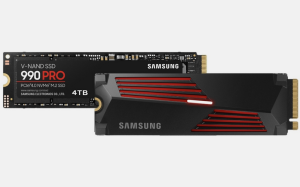
For reliability and data protection, the Samsung 990 PRO SSD incorporates advanced thermal management technologies, error correction, and wear-leveling algorithms to extend the lifespan of the NAND flash memory. It also supports hardware-based security features, including AES 256-bit encryption and compliance with TCG Opal standards, helping protect sensitive data in business and personal computing environments. The drive is supported by Samsung Magician software, which provides a comprehensive set of management tools. Users can monitor drive health, update firmware, optimize performance, run diagnostic scans, securely erase data, and view detailed drive information through an intuitive interface.
How To update Samsung 990 PRO Firmware
Method 1: Use Samsung Magician Software (Recommended)
- Download and install the latest version of Samsung Magician Software. Download for Windows and Download for macOS
- Launch Samsung Magician.
- Select your Samsung 990 PRO NVMe M.2 PCIe SSD, Click Firmaware Update (SSD must be connected from NVMe Slot)
- If a newer firmware is available, you’ll see an Update button.
- Click Update and follow the prompts.
- Restart your computer when prompted to complete the firmware installation.
Note: Before updating, back up any important data and close all other applications. Make sure your laptop is plugged into AC power.
Method 2: Use Bootable Firmware ISO
Download the firmware ISO for your Samsung 990 PRO NVMe M.2 PCIe SSD from here:
Samsung NVMe SSD-990 PRO Series Latest Firmware Download
Firmware file name: Samsung_SSD_990_PRO_8B2QJXD7.iso
Version: 8B2QJXD7
Release : December 2025 (improve read-operation stability)
- Create a bootable USB drive from the ISO.
- Boot your computer from the USB.
- Follow the on-screen firmware update instructions.
- Reboot after the update completes.
If you have a question, you can reach us from the comment section.