
How to update Samsung 990 EVO Firmware (Latest Update)
The Samsung 990 EVO is a high-performance M.2 NVMe SSD designed for client PCs, delivering fast and responsive storage for everyday computing, productivity, gaming, content creation, and demanding applications. It provides ample space for operating systems, applications, games, and large files while maintaining excellent performance.
Featuring a flexible PCIe 4.0 x4 / PCIe 5.0 x2 interface and NVMe 2.0, the Samsung 990 EVO is designed to take advantage of modern PC platforms. It delivers sequential read speeds of up to 5,000 MB/s and sequential write speeds of up to 4,200 MB/s, while random performance reaches up to 700K IOPS read and 800K IOPS write at QD32 for responsive multitasking and demanding workloads.
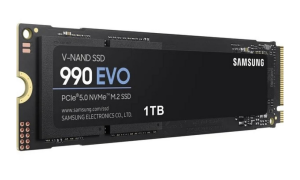
The drive uses Samsung V-NAND TLC memory and a Samsung in-house controller, with HMB (Host Memory Buffer) technology for efficient memory management. It also supports essential storage features including TRIM, S.M.A.R.T., automatic garbage collection, and Device Sleep Mode. For data security, it supports AES 256-bit hardware encryption, along with TCG/Opal and IEEE1667 encrypted-drive standards.
How To update Samsung 990 EVO Firmware
Method 1: Use Samsung Magician Software (Recommended)
- Download and install the latest version of Samsung Magician Software. Download for Windows and Download for macOS
- Launch Samsung Magician.
- Select your Samsung 990 EVO PCIe 4.0 NVMe M.2 SSD, Click Firmaware Update (SSD must be connected from NVMe Slot)
- If a newer firmware is available, you’ll see an Update button.
- Click Update and follow the prompts.
- Restart your computer when prompted to complete the firmware installation.
Note: Before updating, back up any important data and close all other applications. Make sure your laptop is plugged into AC power.
Method 2: Use Bootable Firmware ISO
Download the firmware ISO for your Samsung 990 EVO PCIe 4.0 NVMe M.2 SSD from here:
Samsung NVMe SSD-990 EVO Series Latest Firmware Download
Firmware file name: Samsung_SSD_990_EVO_1B2QKXJ7.iso
Version: 1B2QKXJ7
Description: Improve link stability and VMD driver compatibility
- Create a bootable USB drive from the ISO.
- Boot your computer from the USB.
- Follow the on-screen firmware update instructions.
- Reboot after the update completes.
If you have a question, you can reach us from the comment section.