
Samsung MultiXpress SL-K3250NR Driver and User Manual
The Samsung MultiXpress SL-K3250NR is an A3 monochrome laser multifunction printer designed for medium to large workgroups. Powered by a 1 GHz dual-core processor and 1.5 GB of memory, this multifunction provides smooth operation when processing large print and scan jobs. It features a 7-inch color touchscreen for easy navigation and supports an optional 320 GB hard disk drive (HDD) for enhanced document storage and workflow management.
The Samsung SL-K3250NR delivers print and copy speeds of up to 25 pages per minute (ppm) on A4 paper, with a first-page-out time as fast as 8.5 seconds. It produces sharp documents at a maximum print resolution of 1,200 × 1,200 dpi and is built to handle demanding office workloads with a monthly duty cycle of up to 60,000 pages. For optimal performance and longevity, the recommended monthly print volume is 3,500 to 7,000 pages. For document handling, the printer includes a 100-sheet automatic document feeder (ADF) and a flatbed scanner. It supports scan resolutions of up to 600 dpi and can scan at speeds of up to 45 images per minute (ipm) for simplex documents, making it suitable for digitizing high volumes of paperwork.
Connectivity options include USB 2.0, USB Host, and Gigabit Ethernet, while Wi-Fi and NFC are available as optional upgrades. The Samsung MultiXpress SL-K3250NR also supports a range of mobile printing solutions, including Apple AirPrint, Mopria, Google Cloud Print, Samsung Cloud Print, and PrinterOn. It is compatible with Windows, macOS, Linux, and Unix operating systems.
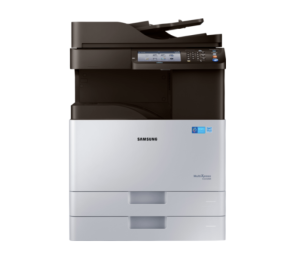
Samsung SL-K3250NR Printer Features
Check below for technical features of the printer:
- Technology: Monochrome Laser
- Functions: Print, Copy, Scan
- Display: 7-inch color touchscreen
- Processor: 1 GHz (dual-core, depending on market documentation)
- Standard Paper Capacity: 100-sheet multipurpose tray + 2 × 520 sheet input trays (1,140 sheets total)
- Output Capacity: 500 sheets
- Print Speed: Up to 25 ppm (A4)
- Print Resolution: Up to 1,200 × 1,200 dpi (best quality)
- Monthly Duty Cycle: Up to 60,000 pages
- Duplex Printing: Automatic (standard)
- Scanner: Flatbed + 100-sheet Automatic Document Feeder (ADF)
- Scan Speed: Up to 45 ipm/ppm (simplex)
- Scan Resolution: Up to 600 dpi optical
- Connectivity: USB 2.0, USB Host, Gigabit Ethernet
- Mobile Printing: AirPrint, Mopria, Google Cloud Print, Samsung Cloud Print, PrinterOn
Read Also: Samsung SL-X7500LX Driver and Manual
Download the Samsung SL-K3250NR Driver and Manuals
Before downloading and installing the Samsung SL-K3250NR driver, read this printer manual to set up the printer properly.
Samsung SL-K3250NR User Guide Download
Filename: c05791038.pdf
File Size: 48.22 MB
Download the Samsung SL-K3250NR Driver
Windows driver:
Samsung SL-K3250NR Printer Driver Download
Filename: K3250_Series_WIN_UPD_V3.00.15.00.01_CDV1.11.exe
File Size: 100.0 MB
Version: V3.00.15.00:01
Samsung SL-K3250NR Scanner Driver Download
Filename: K3250_Series_WIN_Scanner_V3.32.12.20_CDV1.11.exe
File Size: 92.2 MB
Version: V3.32.12.20
macOS driver:
Samsung SL-K3250NR Print and Scan Driver for MacOS Download
Filename: Samsung_Mac_Driver_V3.93.08.dmg
File Size: 32.8 MB
Version: V3.93.08