
Samsung ViewFinity S65VC Manual, Display Manager and Easy Setting Box
The Samsung ViewFinity S65VC is a 34-inch curved monitor designed to enhance productivity, multitasking, and entertainment. Its UWQHD resolution of 3,440 × 1,440 and 21:9 aspect ratio provide a wide workspace, allowing users to view multiple windows side by side. The 1000R curvature creates an immersive viewing experience, while the VA panel delivers a 3,000:1 static contrast ratio and 350 cd/㎡ typical brightness for clear images with rich contrast. With HDR10 support, up to 1.07 billion colours, and a 100Hz refresh rate, it offers detailed visuals and smooth on-screen performance.
Designed for modern work environments, the Samsung ViewFinity S65VC includes a built-in 5MP camera, infrared camera, microphone, and Windows Hello support for convenient video conferencing and secure sign-in. Picture-in-Picture and Picture-by-Picture functions make multitasking easier, and built-in 5W speakers provide convenient audio. Additional features such as AMD FreeSync, Adaptive Picture, Eye Saver Mode, and Flicker Free technology help deliver a comfortable viewing experience throughout the day.
The Samsung ViewFinity S65VC monitor features a sleek black design with an ergonomic stand that supports height adjustment, tilt, and swivel for a more comfortable setup. Connectivity options include HDMI 2.0, DisplayPort 1.2, USB-C, USB-A ports, an Ethernet LAN port, and a headphone connection. Its USB-C connection supports up to 90W charging, while the integrated KVM switch allows users to control multiple connected devices with one keyboard and mouse.
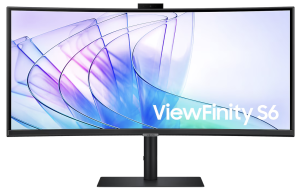
Samsung ViewFinity S65VC Curved WQHD Webcam Business Monitor Features
- Size: 34-inch Curved Display, Immersive 1000R screen curvature.
- Resolution: UWQHD 3,440 × 1,440 21:9 Aspect Ratio
- Refresh Rate: 100Hz HDR10 Support
- Built-in 5MP camera, IR camera, and microphone.
- USB-C Connectivity that Supports up to 90W charging.
- KVM Switch: Control multiple devices with one keyboard and mouse.
Samsung ViewFinity S65VC Series Manual Download
Read this ViewFinity S65VC manual thoroughly to ensure you know how to safely and efficiently operate your appliance’s features and functions. You can download the Samsung ViewFinity S65VC user manual by clicking the link below.
Samsung ViewFinity S65VC Curved WQHD Webcam Business Monitor User Manual Download
File Name: BN81-24647G-03_WEB_S65UC S65VC S65TC_ASIA MENA AFRICA_L05_241108.0.zip
Size: 7.52 MB
Description: See information about product safety, installation, accessories, initial configuration, and product specifications.
Samsung ViewFinity S65VC Curved WQHD Webcam Business Monitor Display Manager Software Download for Windows
File Name: SamsungDisplayManagerMSIX64_2026May26_Ver1.2.6.msi
Size: 166.58 MB
Samsung ViewFinity S65VC Curved WQHD Webcam Business Monitor Display Manager Software Download for macOS
File Name: SamsungDisplayManager-macOS-1.0.0.pkg
Size: 75.43 MB
Samsung ViewFinity S65VC Curved WQHD Webcam Business Monitor Easy setting box Download sofware for Windows
File Name: EasySettingMSIX64_V3.0.11.msi
Size: 34.66 MB
Samsung ViewFinity S65VC Curved WQHD Webcam Business Monitor Easy setting box Download sofware for macOS
File Name: EasySettingBox_macOS_v3.1.6.pkg
Size: 51.31 MB
If you face a problem when operating the Samsung ViewFinity S65VC Monitor, please read the User Manual and Installation Guide.