
Samsung SL-M2876ND Driver and Manual (User Guide)
The Samsung Xpress SL-M2876ND is a compact and reliable monochrome multifunction printer combining print, scan, and copy functions in one efficient device. It delivers consistent performance while maintaining a space-saving footprint. A built-in 2-line LCD control panel allows for easy navigation and operation, while a powerful 600 MHz processor and 128 MB of memory ensure smooth handling of multiple tasks.
The printer offers fast output with print and copy speeds of up to 28 pages per minute in A4. The first print comes out in less than 8.5 seconds, helping users minimize waiting time, while copy jobs are completed quickly with first copy times under 15 seconds. High-quality output is supported by an effective print resolution of 4800 x 600 dpi, along with support for PCL5e, PCL6, and SPL emulations. The Samsung Xpress SL-M2876ND also features built-in automatic duplex printing, reducing paper usage and operating costs. The scanning function uses Color CIS technology, delivering sharp and accurate results with an optical resolution of up to 1200 x 1200 dpi, enhanced up to 4800 x 4800 dpi. It supports TWAIN and WIA standards, making it compatible with a wide range of applications. Copy features such as ID copy, 2-up and 4-up copying, collation, and auto-fit provide added convenience for everyday office tasks, with zoom options ranging from 25% to 400%.
Designed for flexible media handling, the Samsung Xpress SL-M2876ND includes a 250-sheet cassette tray and a 1-sheet multipurpose tray, supporting various paper sizes and media types, including envelopes, labels, cardstock, transparencies, and recycled paper. With a maximum monthly duty cycle of up to 12,000 pages, it is well-suited for moderate workloads. Network connectivity is enabled through Hi-Speed USB 2.0 and Ethernet (10/100 Base-TX), allowing easy integration into office environments.
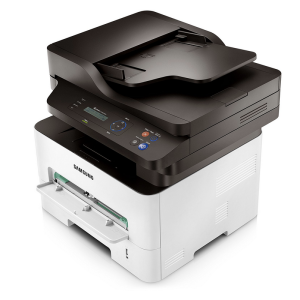
Samsung SL-M2876ND Printer Features
Check below for technical features of the printer:
- Function: Print, scan, and copy in a single compact device.
- Processor: 600 MHz processor with 128 MB memory.
- Paper Handling: 250-sheet input tray
- Page Speed: Up to 28 ppm print and copy speed, with a first printout time under 8.5 seconds.
- Output: 4800 × 600 dpi for sharp, professional documents.
- Automatic Duplex Printing: Built-in two-sided printing helps reduce paper usage and costs.
- Connectivity: Hi-Speed USB 2.0 and Ethernet (10/100 Base-TX) for easy sharing in office environments.
Read Also: Samsung Xpress SL-M2625D Driver and Manual
Download the Samsung SL-M2876ND Driver and Manuals
Before downloading and installing the Samsung SL-M2876ND driver, read this printer manual to set up the printer properly.
Samsung SL-M2876ND User Guide Download
Filename: c05790356.pdf
File Size: 20.91 MB
Download the Samsung SL-M2876ND Driver
Windows driver:
Samsung SL-M2876ND Windows Print Driver Download
Filename: M267x_287x_Series_WIN_SPL_PCL_V3.13.13.00.01_CDV1.44.exe
File Size: 40.5 MB
Version: V3.13.13.00:01
Samsung SL-M2876ND Windows Scan Driver Download
Filename: M267x_287x_Series_WIN_Scanner_V3.31.19.04_CDV1.44.exe
File Size: 26.2 MB
Version: V3.31.19.04
macOS driver:
Samsung SL-M2876ND macOS Universal Print and Scan Driver Download
Filename: Samsung_Mac_10.15_Driver_V3.92.00.dmg
File Size: 20.4 MB
Version: V3.92.00