
Samsung SCX-5935NX Driver and User Manual
The Samsung SCX-5935NX is a robust monochrome multifunction system designed to meet the demands of busy office environments. Paper handling is flexible and scalable to support a variety of office workflows. It comes standard with a 500-sheet drawer and a 50-sheet bypass tray, providing a total standard capacity of 550 sheets. It supports paper weights ranging from 20 to 28 lb through the main drawer and 16 to 43 lb through the bypass tray. With the ability to expand to three paper sources and a maximum capacity of 1,050 sheets, the system minimizes interruptions for refilling paper. It accommodates different media sizes, ranging from 3 x 5 inches to 8-1/2 x 14 inches.
Delivering fast and reliable performance, it produces up to 35 pages per minute for both printing and copying, with a first copy time of just 9.5 seconds and a first-page-out time of 8.5 seconds. A warm-up time of approximately 50 seconds ensures the device is quickly ready for daily operation, making it well-suited for workgroups that require consistent productivity. For scanning tasks, the Samsung SCX-5935NX delivers fast performance with scan speeds of up to 35 images per minute and a maximum scan resolution of 600 x 600 dpi, making it suitable for digitizing documents with clarity and accuracy. Copy and print quality is sharp and professional, with a standard 600 x 600 dpi copy resolution and enhanced print resolution of up to 1200 x 1200 dpi. The device supports industry-standard print languages, including PCL 5e/6, PostScript 3, and XPS, ensuring broad compatibility across various business applications.
Powered by a Chorus-3 processor running at 360 MHz, the system handles complex jobs smoothly and efficiently. With 256 MB of standard system memory (expandable to 512 MB) and an 80 GB hard drive, this Samsung SCX-5935NX provides the processing power and storage capacity needed for reliable, everyday document management. Standard connectivity includes USB 2.0 and 10/100Base-TX Ethernet, allowing easy integration into networked office environments.
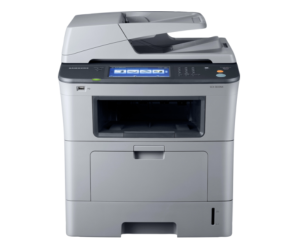
Samsung SCX-5935NX Printer Features
Check below for technical features of the printer:
- 256 MB memory (upgradeable to 512 MB) with 80 GB hard drive
- 500-sheet paper tray plus 50-sheet bypass (550 sheets total)
- Expandable up to 1,050 sheets
- Supports paper sizes up to 8.5 × 14 inches
- Prints, copies, and scans at 35 pages per minute
- Fast output with the first copy in 9.5 seconds
- Sharp output with up to 1200 × 1200 dpi print resolution
- Copy and scan resolution: 600 × 600 dpi
- Built-in Ethernet networking and USB 2.0
- Print languages: PCL, PostScript, XPS
Read Also: Samsung SL-M4080FX Driver and Manual
Download the Samsung SCX-5935NX Driver and Manuals
Before downloading and installing the Samsung SCX-5935NX driver, read this printer manual to set up the printer properly.
Samsung SCX-5935NX User Guide Download
Filename: c05786984.pdf
File Size: 11.58 MB
Download the Samsung SCX-5935NX Driver
Windows driver:
Samsung SCX-5935NX Universal Print Driver Download
Filename: SamsungUniversalPrintDriver3_V3.00.16.0101.01.exe
File Size: 38.5 MB
Version: V3.00.16.0101.01
Samsung SCX-5935NX Print Driver Download
Filename: Samsung_SCX-5835_5935X_Series_PD.exe
File Size: 21.8 MB
Version: V3.11.76.01:15
Samsung SCX-5935NX Scan Driver Download
Filename: Samsung_SCX-5835_5935X_Series_Scan.exe
File Size: 8.0 MB
Version: V3.21.38:06
macOS driver:
Samsung SCX-5935NX Driver for MacOS (Wireless Setup) Download
Filename: Wireless_Setting_Mac_V1.4.25.zip
File Size: 3.6 MB
Version: V1.4.25