
Samsung CLX-9251 Driver and Manual (User Guide)
The Samsung MultiXpress CLX-9251 is a powerful, enterprise-grade color multifunction printer designed for demanding office environments. Built around a 1 GHz dual-core processor and 1 GB of DDR3 memory, it delivers fast, reliable performance for high-volume printing, copying, and scanning tasks. A large 7-inch color touchscreen LCD with a 1,024 × 600 resolution provides an intuitive user experience, making job management and workflow control simple and efficient.
The printer supports a large paper capacity of up to 2,180 sheets, reducing the need for frequent refills, and offers a standard 500-sheet output capacity. High-quality print resolution reaches 1,200 × 1,200 dpi for sharp, professional color output, with enhanced effective resolutions available for detailed graphics and images. Print speeds of up to 25 pages per minute (with second exit) make it a reliable solution for productivity-focused offices. With a robust monthly duty cycle of up to 100,000 pages, the Samsung CLX-9251 is well-suited for busy workgroups and departments.
With broad emulation support including PCL5c, PCL6 (XL), PostScript Level 3, PDF, and XPS, as well as an extensive font library, the Samsung MultiXpress CLX-9251 ensures compatibility across various applications and operating systems. Equipped with comprehensive connectivity options, including USB 2.0, Gigabit Ethernet, and advanced network protocols (IPv4/IPv6, SNMP, LDAP, SMTP, SSL/TLS, IPSec, and more), the device integrates seamlessly into complex IT environments while maintaining high security standards. Features such as IP/MAC filtering, 802.1x authentication, SNMPv3, and encrypted communication help protect sensitive business data.
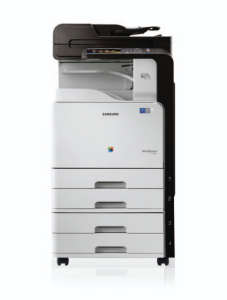
Samsung CLX-9251 Printer Features
Check below for technical features of the printer:
- Core Specs: 1 GHz dual-core processor with 1 GB DDR3 memory for fast, reliable operation
- User-Friendly Control: 7” color touchscreen LCD (1,024 × 600 resolution)
- Fast Printing: Up to 25 ppm (with 2nd exit) / 17 ppm (without 2nd exit)
- Superior Print Quality: Real 1,200 × 1,200 dpi (High Quality), Up to 9,600 × 600 dpi effective resolution
- Large Paper Capacity: Maximum: 2,180 sheets, Standard: 1,140 sheets (520 × 2 trays + 100-sheet MP tray)
- High Duty Cycle: Up to 100,000 pages per month, ideal for busy offices
- Robust Connectivity: USB 2.0 (device & host), Gigabit Ethernet (10/100/1000)
Read Also: Samsung CLX-6260FR Driver and Manual
Download the Samsung CLX-9251 Driver and Manuals
Before downloading and installing the Samsung CLX-9251 driver, read this printer manual to set up the printer properly.
Samsung CLX-9251 User Guide Download
Filename: c05786231.pdf
File Size: 32.39 MB
Download the Samsung CLX-9251 Driver
Windows driver:
Samsung CLX-9251 Windows PCL6 Print Driver Download
Filename: CLX-92x1_93x1_Series_WIN_PCL_V3.12.29.07.51.exe
File Size: 41.8 MB
Version: V3.12.29.07.51
Samsung CLX-9251 Windows PostScript Driver Download
Filename: CLX-92x1_93x1_Series_WIN_PS_V2.00.99.01.51.exe
File Size: 39.7 MB
Version: V2.00.99.01.51
Samsung CLX-9251 Windows Scan Driver Download
Filename: CLX-92x1_93x1_Series_WIN_Scanner_V3.31.19.13.exe
File Size: 22.6 MB
Version: V3.31.19.13
macOS driver:
Samsung CLX-9251 macOS Print Driver Download
Filename: CLX-92x1_93x1_Mac_PrinterDriver_V1.27.00.zip
File Size: 7.4 MB
Version: V1.27.00
Samsung CLX-9251 macOS Scan Driver Download
Filename: CLX-92x1_93x1_Series_Mac_ScanDriver_V2.31.54.zip
File Size: 50.0 MB
Version: V2.31.54