
Samsung HW-Q935D User Manual
The Samsung HW-Q935D soundbar delivers an immersive 9.1.4-channel surround sound experience with 17 speakers, a wireless subwoofer, and wireless rear speakers. With Dolby Atmos and up-firing speakers, it creates rich, three-dimensional sound that brings movies, music, and games to life. Its Titan Black finish adds a modern, elegant touch to your home entertainment setup.
Enjoy clear dialogue and balanced audio with features such as Active Voice Amplifier, Voice Enhance Mode, and Adaptive Sound. SpaceFit Sound automatically adjusts the audio to suit your room, while Game Pro mode enhances the gaming experience. Night Mode helps reduce sound intensity for more comfortable listening at night. With Q-Symphony, the soundbar can work together with compatible Samsung TVs for a more immersive audio experience.
The Samsung HW-Q935D supports Wireless Dolby Atmos, 4K video pass-through at 60Hz, and HDR10+ for compatible content. Connect easily through HDMI eARC, optical input, Bluetooth 5.2, or Wi-Fi. Stream music using AirPlay, Chromecast, Spotify Connect, and the SmartThings app. With a multi-position rear speaker design and convenient One Remote Control support, this soundbar offers flexible placement, easy operation, and powerful entertainment throughout your home.
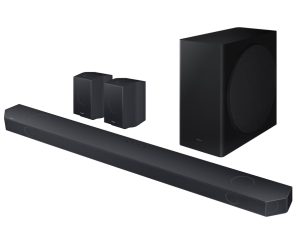
Samsung HW-Q935D Soundbar 9.1.4CH with subwoofer and rear speakers features
- 9.1.4-Channel Surround Sound, 17 Speakers for immersive audio
- Dolby Atmos and Wireless Dolby Atmos, Wireless Subwoofer and Rear Speakers
- Q-Symphony with compatible Samsung TVs, SpaceFit Sound for room-adaptive audio
- Adaptive Sound and Active Voice Amplifier, Game Pro Mode for enhanced gaming audio
- HDMI eARC with 4K 60Hz pass-through and HDR10+
- Wi-Fi, Bluetooth 5.2, AirPlay, Chromecast, Spotify Connect and SmartThings app support
Samsung HW-Q935D Series Manual Download
Read this HW-Q935D manual thoroughly to ensure you know how to safely and efficiently operate your appliance’s features and functions. You can download the Samsung HW-Q935D user manual by clicking the link below.
Samsung Soundbar HW-Q935D 9.1.4CH with subwoofer and rear speakers User Manual Download
File Name: AH81-17418A-00_WUG_HW-Q930D Q800D Q700D_EN ZF XN XE ZG_L24_240322.0.pdf
Size: 224.00 MB
Description: See information about product safety, installation, accessories, initial configuration, and product specifications.
Samsung Soundbar HW-Q935D 9.1.4CH with subwoofer and rear speakers Simple User Guide Download
File Name: AH81-17410H-01_SUG_HW-Q935D Q810D_XE_L06_240419.0.pdf
Size: 16.46 MB
Description: Simple version of User manual.
If you face a problem when operating the Samsung HW-Q935D Soundbar system, please read the User Manual and Repair Guide.