
Samsung 980 PRO Firmware Download (Latest Update)
The Samsung 980 PRO is a high-performance internal NVMe® solid-state drive designed for client PCs, gaming systems, and demanding applications. Built around PCIe® 4.0 x4 and the NVMe® 1.3c interface, it delivers sequential read speeds of up to 7,000 MB/s and sequential write speeds of up to 5,100 MB/s, providing fast loading, responsive system performance, and efficient data transfers. Featuring Samsung V-NAND 3-bit MLC flash memory, an in-house Samsung controller, and 2GB of Low Power DDR4 SDRAM cache, the Samsung 980 PRO is engineered for high-speed and consistent performance. Its M.2 2280 form factor makes it compatible with a wide range of modern desktops, workstations, and compatible laptops. It is also backward compatible with PCIe® 3.0, delivering up to 3,500 MB/s sequential read and 3,470 MB/s sequential write performance when used with a PCIe 3.0 interface.
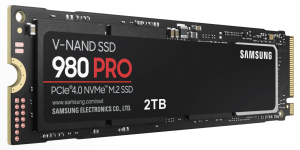
The Samsung 980 PRO SSD PCIe 4.0 NVMe M.2 SSD offers advanced security features, including AES 256-bit full-disk encryption, TCG/Opal V2.0, and IEEE1667 encrypted-drive support. Additional features include TRIM support, S.M.A.R.T. monitoring, automatic garbage collection, and Device Sleep Mode support. With a rated shock resistance of up to 1,500 G and 0.5 ms (half sine), the drive is designed to provide reliable storage performance for everyday computing and high-performance workloads. With its combination of PCIe 4.0 performance, advanced V-NAND technology, strong security features, and gaming-oriented design, the Samsung 980 PRO is a powerful storage solution for users seeking fast and responsive PC performance.
How To update Samsung 980 PRO Firmware
Method 1: Use Samsung Magician Software (Recommended)
- Download and install the latest version of Samsung Magician Software. Download for Windows and Download for macOS
- Launch Samsung Magician.
- Select your Samsung 980 PRO PCIe 4.0 NVMe M.2 SSD, Click Firmaware Update (SSD must be connected from NVMe Slot)
- If a newer firmware is available, you’ll see an Update button.
- Click Update and follow the prompts.
- Restart your computer when prompted to complete the firmware installation.
Note: Before updating, back up any important data and close all other applications. Make sure your laptop is plugged into AC power.
Method 2: Use Bootable Firmware ISO
Download the firmware ISO for your Samsung 980 PRO PCIe 4.0 NVMe M.2 SSD from here:
Samsung NVMe SSD-980 PRO Series Latest Firmware Download
Firmware file name: Samsung_SSD_980_PRO_5B2QGXA7.iso
Version: 5B2QGXA7
- Create a bootable USB drive from the ISO.
- Boot your computer from the USB.
- Follow the on-screen firmware update instructions.
- Reboot after the update completes.
If you have a question, you can reach us from the comment section.