
Samsung SCX-4833FR Driver and User Manual
The Samsung SCX-4833FR is a reliable monochrome laser multifunction printer designed for efficient printing, scanning, copying, and faxing in busy office environments. It supports plain paper, card stock, envelopes, labels, and OHP film, with support for A4, Legal, and custom paper sizes. Its standard media capacity is 300 sheets, expandable up to 820 sheets, with a 250-sheet cassette, 50-sheet multipurpose feeder, 50-sheet automatic document feeder, and 150-sheet output bin.
With print and copy speeds of up to 31 pages per minute, a maximum print resolution of 1200 × 1200 dpi, and automatic duplex printing, it delivers professional-quality documents while helping reduce paper consumption. The flatbed scanner features a CIS image sensor, 1200 dpi optical resolution, and colour scanning capability, with support for documents up to 216 × 297 mm. For copying, Samsung SCX-4833FR offers up to 31 copies per minute, resolutions up to 1200 × 1200 dpi, and copy scaling from 25% to 400%, with up to 99 copies per job. The integrated monochrome fax provides 33.60 Kbps modem speed, 300 × 300 dpi maximum resolution, and memory capacity for up to 445 pages. Its Group 3 fax compliance makes it well suited for everyday business communication.
With support for PCL 5e, PCL 6, PostScript 3, IBM ProPrinter, and TIFF emulations and a monthly duty cycle of up to 50,000 pages, the Samsung SCX-4833FR is a versatile solution for offices requiring dependable, high-volume monochrome document processing. Powered by a 600 MHz processor and 256 MB of standard memory, expandable up to 768 MB, the printer is built to handle demanding document workflows. It supports USB and Gigabit Ethernet connectivity, making it suitable for both individual workstations and networked office environments.
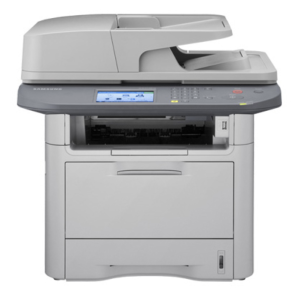
Samsung SCX-4833FR Printer Features
Check below for technical features of the printer:
- Type: Monochrome Laser Multifunction Printer
- Display: LCD
- Functions: Print, Copy, Scan, Fax
- Print Speed: Up to 31 ppm
- Print Resolution: Up to 1200 × 1200 dpi
- Scanner Type: Flatbed CIS
- Scan Resolution: Up to 1200 × 1200 dpi optical; 4800 × 4800 dpi interpolated
- Copy Speed: Up to 31 cpm
- Copy Resolution: Up to 1200 × 1200 dpi
- Connectivity: USB, Gigabit Ethernet
- Print Languages: PCL 5e, PCL 6, PostScript 3, IBM ProPrinter, TIFF
Read Also: Samsung SCX-6322DN Driver and Manual
Download the Samsung SCX-4833FR Driver and Manuals
Before downloading and installing the Samsung SCX-4833FR driver, read this printer manual to set up your printer properly.
Samsung SCX-4833FR User Guide Download
Filename: c05786906.pdf
File Size: 49.11 MB
Download the Samsung SCX-4833FR Driver
Windows driver:
Samsung SCX-4833FR Print Driver Download
Filename: SCX-483x_5x3x_Series_WIN_PD_V3.12.29.08.33.exe
File Size: 28.8 MB
Version: V3.12.29.08.33
Samsung SCX-4833FR Scan Driver Download
Filename: SCX-483x_5x3x_Series_WIN_Scanner_V3.21.65.11_CDV1.51.exe
File Size: 25.5 MB
Version: V3.21.65.11
macOS driver:
Samsung SCX-4833FR Printer Driver for MacOS Download
Filename: SCX-483x_5x3x_Series_Mac_PrinterDriver_V5.04.zip
File Size: 8.1 MB
Version: V5.04
Samsung SCX-4833FR Scanner Driver for MacOS Download
Filename: SCX-483x_5x3x_Series_Mac_ScanDriver_V2.31.48.zip
File Size: 57.9 MB
Version: V2.31.48