
Samsung MultiXpress SL-M4370LX Driver and Manual
The Samsung MultiXpress SL-M4370LX is a high-performance monochrome multifunction printer built to meet the demands of busy offices and enterprise workgroups. Powered by a 1 GHz dual-core processor and equipped with 4 GB RAM (or 2 GB standard, depending on regional configuration) plus a 320 GB hard disk drive, it delivers fast, reliable performance for high-volume printing, copying, scanning, and document management. This device comes with a 620-sheet standard paper capacity, including a 520-sheet input tray and a 100-sheet multipurpose bypass tray, and can be expanded to up to 3,140 or 3,240 sheets to support continuous, high-volume printing with minimal interruptions. It supports a wide range of media sizes, including A4, A5, A6, Letter, Legal, and envelopes.
Designed for productivity, Samsung SL-M4370LX prints and copies at speeds of up to 43 pages per minute (A4) with a first page out time of as fast as 8 seconds for printing and less than 5 seconds for copying. It produces sharp, professional-quality documents with an effective print resolution of up to 1200 × 1200 dpi. For efficient document digitization, the printer features a 100-sheet Automatic Document Feeder (ADF) capable of scanning at speeds of up to 43–50 images per minute (ipm) for single-sided documents and up to 70–80 ipm for double-sided scanning, making it ideal for fast workflow processing.
Built for demanding business environments, the printer offers a maximum monthly duty cycle of up to 250,000 pages, ensuring dependable operation under heavy workloads. Samsung MultiXpress SL-M4370LX has Hi-Speed USB 2.0, USB Host, and Gigabit Ethernet, allowing seamless integration into office networks.
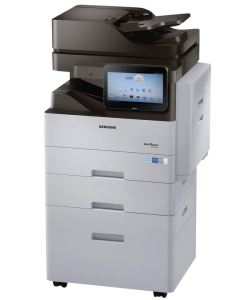
Samsung MultiXpress SL-M4370LX Printer Features
Check below for technical features of the printer:
- Processor: 1 GHz dual-core processor
- Memory and storage: 4 GB RAM (or 2 GB standard depending on regional configuration) and a 320 GB hard disk drive
- Standard input capacity: 620 sheets standard (520-sheet input tray and 100-sheet multipurpose bypass tray), expandable up to 3,140 or 3,240 sheetsAutomatic document feeder (ADF): 100-sheet capacity
- Supported media sizes: A4, A5, A6, Letter, Legal, and envelopes
- Print and copy speed: Up to 43 pages per minute (A4)
- Resolution: Up to 1200 x 1200 dpi effective output
- First page out time: As fast as 8 seconds for printing, less than 5 seconds for copying
- Scan speed: Up to 43–50 ipm single-sided and up to 70–80 ipm double-sided (higher in specific dual-scan modes)
- Duty cycle: Up to 250,000 pages per month maximum
- Interface ports: Hi-Speed USB 2.0, USB Host, and Gigabit Ethernet network connectivity
Read Also: Samsung SL-M3820DW Driver and Manual
Download the Samsung SL-M4370LX Driver and Manuals
Before downloading and installing the Samsung SL-M4370LX driver, read this printer manual to set up the printer properly.
Samsung SL-M4370LX User Guide Download
Filename: c05790679.pdf
File Size: 59.32MB
Samsung SL-M4370LX Quick Installation Guide Download
Filename: c05567444.pdf
File Size: 4.35MB
Download Samsung MultiXpress SL-M4370LX Driver
Windows driver:
Samsung SL-M4370LX Windows Print Driver Download
Filename: M4370_5370_Series_WIN_Printer_V3.13.14.08.41_CDV1.38.zip
File Size: 19.9MB
Version: V3.13.14.08:41
Samsung SL-M4370LX Windows PCL6 Driver Download
Filename: M4370_5370_Series_WIN_PCL_V3.13.14.08.41_CDV1.38.exe
File Size: 34.0MB
Version: V3.13.14.08:41
Samsung SL-M4370LX Windows Scan Driver Download
Filename: M4370_5370_Series_WIN_Scanner_V3.32.12_CDV1.38.exe
File Size: 19.5MB
Version: V3.32.12
macOS driver:
Samsung SL-M4370LX macOS Printer and Scanner Driver Download
Filename: M4370_5370_Series_Mac_Driver_V1.23.00.dmg
File Size: 14.5 MB
Version: V1.23.00