
Samsung SL-C480 Driver and Manual (User Guide)
The Samsung SL-C480 is a compact color laser multifunction printer designed for home and small office use. It combines printing, scanning, and copying in a single device. The printer uses laser technology, is powered by an 800 MHz processor, and includes 128 MB of memory. Paper handling is suitable for light to moderate workloads. The printer has a 150-sheet input tray and a 50-sheet output tray. It supports paper sizes ranging from 76 × 152 mm up to 216 × 356 mm (Legal), with paper weights between 60 and 220 g/m². Supported media types include plain paper, thick paper, labels, cardstock, recycled paper, colored paper, and glossy media.
Samsung SL-C480 prints at speeds of up to 18 pages per minute in black and white and up to 4 pages per minute in color. It delivers a maximum print resolution of 2,400 × 600 dpi. The first page prints in about 14 seconds for black and 26 seconds for color. The maximum recommended monthly duty cycle is up to 20,000 pages. The copying function matches the print speed, offering up to 18 copies per minute in black and white and 4 copies per minute in color. It allows resizing from 25% to 400% and can produce up to 999 copies in a single job. Scanning is handled by a flatbed CIS scanner with an optical resolution of up to 1,200 × 1,200 dpi. The scanner supports common file formats such as PDF, JPG, and TIFF, and scanning can be initiated from the front control panel or via TWAIN/WIA software on a computer.
The Samsung SL-C480 uses separate toner cartridges for black, cyan, magenta, and yellow. Standard black toner yields about 1,500 pages, while each color toner yields about 1,000 pages. Starter cartridges included with the printer have lower yields. The printer is compatible with Windows, macOS, and Linux operating systems. The printer supports multiple print languages, including PCL5c, PCL6, PostScript 3, SPL, and PDF. Manual duplex printing is supported through the printer driver.
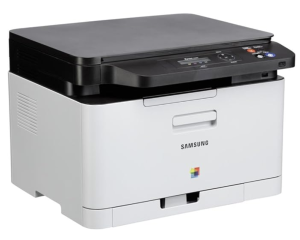
Samsung SL-C480 Printer Features
Check below for technical features of the printer:
- Type: Color laser multifunction printer
- Functions: Print, scan, copy
- Processor: 800 MHz
- Memory: 128 MB
- Display: 2-line LCD
- Paper input tray: 150 sheets
- Paper output tray: 50 sheets
- Supported media types: Plain, thick, labels, cardstock, recycled, colored, glossy
- Print speed: Black & white: up to 18 ppm, Color: up to 4 ppm
- Print resolution: up to 2,400 × 600 dpi
- Monthly duty cycle: up to 20,000 pages
- Connectivity: USB 2.0
- Operating systems: Windows, macOS (older versions), Linux
Download the Samsung SL-C480 Driver and Manuals
Before downloading and installing the Samsung SL-C480 driver, read this printer manual to set up the printer properly.
Samsung SL-C480 User Guide Download
Filename: c05788749.pdf
File Size: 36.71 MB
Download the Samsung SL-C480 Driver
Windows driver:
Samsung SL-C480 Windows Print Driver Download
Filename: C48x_Series_WIN_UPD_V3.00.16.00.01_CDV1.23.exe
File Size: 56.7 MB
Version: V3.00.16.00.01
Samsung SL-C480 Windows Scan Driver Download
Filename: C48x_Series_WIN_Scanner_V3.32.12.20_CDV1.23.exe
File Size: 46.8 MB
Version: V3.32.12.20
macOS driver:
Samsung SL-C480 macOS Universal Print and Scan Driver Download
Filename: Samsung_Mac_10.15_Driver_V3.92.00.dmg
File Size: 20.4 MB
Version: V3.92.00